
Turning my story folder into a writing system using loop engineering
I have hundreds of stories sitting in a folder.
Some are developed ideas. Some are handwritten notes, bullet points, images, or short lessons captured before I forgot them. The collection is valuable, but it created a familiar problem: having more source material did not automatically create more published writing.
The hard part was not only writing the final article. The friction started much earlier:
- deciding which story deserved attention next
- remembering what had already been drafted
- connecting each draft back to its source
- tracking what was waiting for review
- returning to feedback instead of losing it in another note
- knowing what had already been published
Good ideas can wait for years when the coordination around them is too heavy.
So I built a blog writing assistant using loop engineering.
Not a single large prompt. Not a batch job that tries to process the whole folder. A durable loop that can wake up repeatedly, do one bounded piece of work, save its state, and wait for the next run.
Why A Prompt Was Not Enough
A one-off prompt can help write an article, but it does not create a reliable writing system.
The assistant needs to answer workflow questions before it writes anything:
- Which stories are available?
- Which stories have I intentionally queued?
- Is another run already drafting something?
- Which drafts are waiting for my review?
- Which feedback should be handled first?
- Which draft version is current?
- Has an article been approved or published?
These are state questions, not generation questions.
That distinction changed how I approached the design. The AI should help with interpretation, drafting, revision, and structure. Deterministic code should own selection, state transitions, validation, and file relationships.
The prompt is only one part of the assistant. The loop is the product.
What Loop Engineering Means Here
Sydney Runkle’s article, The Art of Loop Engineering, describes agent systems as a stack of loops: an agent loop, a verification loop, an event-driven loop, and a hill-climbing loop.
My blog assistant is a practical version of that idea.
- The agent loop drafts or revises one selected story.
- The verification loop combines deterministic validation, a writing quality gate, and human review.
- The event-driven loop is an hourly scheduled task named
Blog Writing Loop. - The hill-climbing loop is still future work. Feedback improves individual drafts today, but the system does not yet analyse patterns across runs and improve its own instructions.
The important shift is that the assistant is no longer a one-time text generator. It is part of a workflow with memory, limits, gates, and visibility.
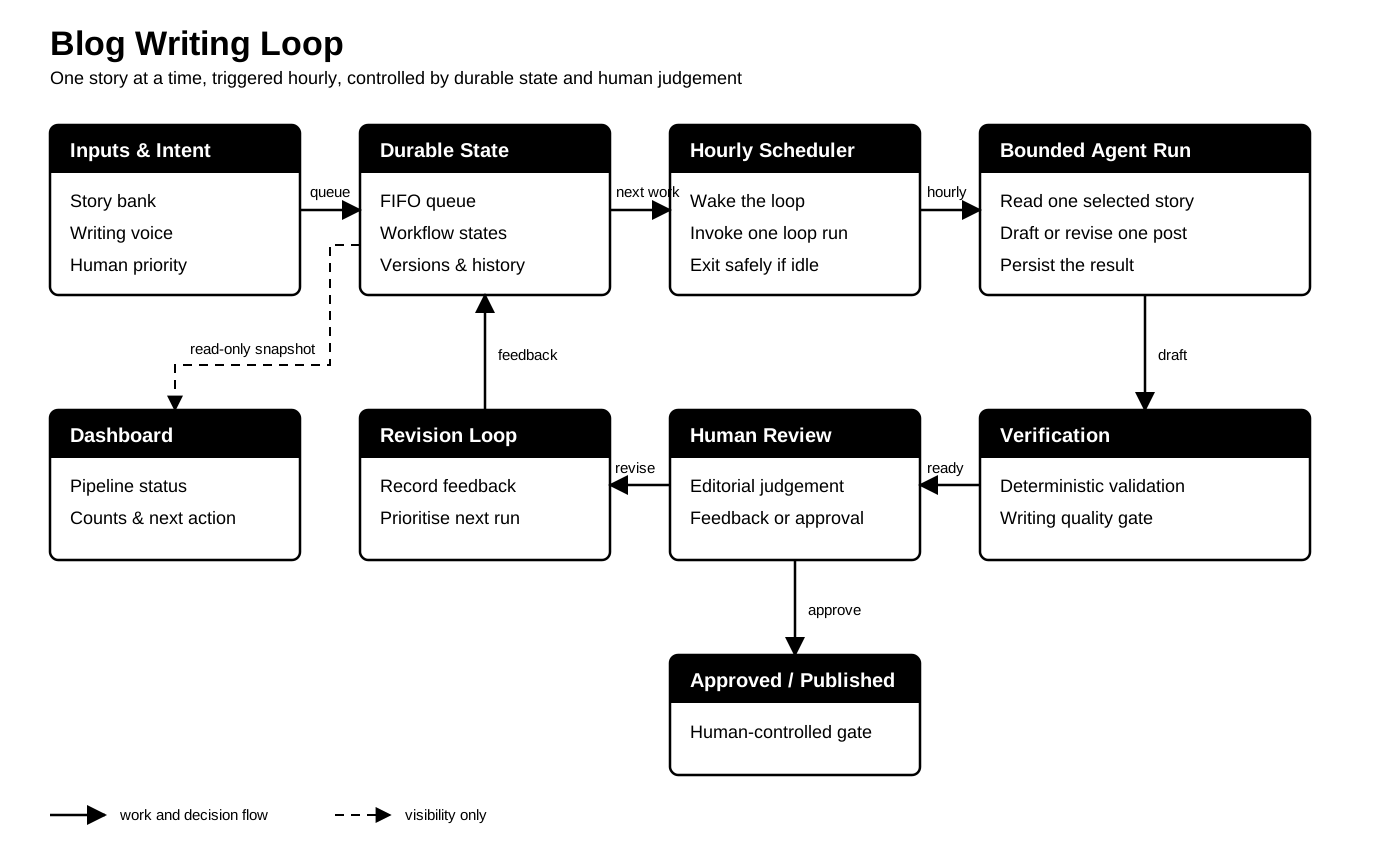
The same system can also be viewed as a set of nested loops. The hourly schedule starts the event-driven loop. Inside it, the writing agent works with repository tools on one story. The draft then passes through deterministic checks and human review. Feedback returns to durable state for a later run, while an approved or published result leaves the next item ready for another hourly cycle.

The Workflow I Built
The workflow starts with explicit human priority.
I choose which stories enter the queue. The assistant does not automatically pick any unprocessed story just because it exists. That matters because a story bank can contain incomplete, private, low-priority, or context-dependent material.
Once a story is queued, the loop handles one action per run:
- Sync one explicit review decision if one exists.
- Resume interrupted drafting if needed.
- Apply the oldest requested revision.
- Otherwise draft the oldest queued story.
- Move the draft to human review.
- Regenerate the dashboard and validate the state.
The loop is intentionally small. Each run does one bounded action and then stops.
That constraint makes the system safer. It also makes it easier to inspect. If something changes, I can see which story was touched, which draft was created, which review file is waiting, and what the next human action should be.
State Is Part Of The Assistant
The system uses repository-backed state to track the writing pipeline.
The main states are:
unprocessed -> queued -> drafting -> needs-review -> approved -> published
                               |          ^
                               v          |
                          needs-input     |
                                          |
                     revision-requested --+
The state file connects stories to drafts and review files. It records draft versions, queue order, publication details, and transition history.
This might sound less exciting than the writing prompt, but it is what makes the assistant reliable. Without durable state, every run has to rediscover the world. With durable state, the assistant can continue from where the last run stopped.
State also creates recovery behaviour. If a run is interrupted while drafting, the next run can resume that item instead of claiming another story. If feedback is requested, revision work takes priority over new drafting. If nothing is queued, the assistant exits cleanly.
The Design Correction That Made The Pipeline Work
My first workflow treated drafting, needs-input, needs-review, and revision-requested as one combined work-in-progress limit.
That sounded safe, but it was the wrong constraint.
As soon as one draft moved to needs-review, the whole assistant stopped. It could not draft the next queued story until I completed review and publication for the previous one.
The better model was:
- only one story may be actively
drafting - multiple completed drafts may wait in
needs-review - missing information for one story should not block another queued story
- revision requests take priority over new drafts
- a completed draft releases the drafting slot immediately
That distinction matters beyond this blog workflow. Waiting is different from working. A system should limit active machine work without treating every human review queue as a blocker.
Human Control Has To Be Concrete
“Human in the loop” is easy to say and easy to implement poorly.
In this workflow, human control is explicit:
- I choose what enters the queue.
- The assistant can prepare drafts, but it cannot approve them.
- Review files require a clear decision such as
revise,approve,park,skip, orpublish. - Publication requires a URL and date.
- Praise, silence, or general satisfaction does not count as approval.
Those rules may feel strict, but they protect editorial judgement. The assistant can reduce coordination cost without taking over intent, approval, or publication.
The Dashboard Builds Trust
The loop also generates a local dashboard.
It shows story counts, workflow states, queued work, drafts waiting for review, category distribution, publication links, and recent transitions. It is a read-only view generated from the same repository state used by the assistant.

That visibility is important. Automation becomes easier to trust when you can see what it believes, what it changed, and what it plans to do next.
For me, the dashboard turns a folder of scattered writing material into a pipeline I can inspect.
What This Changes
The biggest benefit is not that AI can draft faster. The bigger benefit is that the writing process now has continuity.
The assistant can wake up hourly, check the current state, perform one bounded action, and stop. It does not need me to remember the next step every time. It does not need to reread the entire story bank. It does not need to guess whether a draft is approved.
The system gives me steady progress without removing my editorial role.
That is the useful pattern for many personal and team workflows:
- keep human intent explicit
- make state durable
- let deterministic code own the workflow rules
- let the agent handle bounded interpretation and creation
- add validation and human gates
- make progress visible
Loop engineering turns AI from a clever response into a repeatable operating system for a specific kind of work.
Try This Week
Choose one recurring workflow where you already use AI and ask:
- What state does the assistant need to remember between runs?
- What decision should remain explicitly human-controlled?
- What is the smallest useful action the assistant can safely perform in one run?
Then build the loop around that.
Start with one item at a time. Add durable state. Add a review gate. Add a dashboard or status view.
The goal is not to automate everything. The goal is to make useful progress repeatable without losing judgement.

